UX Case Study

ODU Graduation Status Portal
SIMPLIFYING THE GRADUATION EXPERIENCE FOR OLD DOMINION STUDENTSThe ODU Graduation Status Portal is a UX/UI redesign concept created to simplify how students track graduation requirements, deadlines, eligibility, and ceremony information within the Old Dominion University student portal.

This project focuses on solving the confusion and stress students experience when navigating graduation requirements by improving clarity, organization, and trust within the graduation experience.
UX Researcher, UX/UI Designer
Spring 2026
Figma, Google Forms, FigJam, Adobe Illustrator
Improve clarity. reduce stress, and build trust in graduation informationCONTEXT
Students preparing for graduation often need to navigate multiple disconnected systems such as DegreeWorks, LEOnline, commencement pages, advisor emails, and departmental resources. Information is spread across several pages, creating uncertainty about whether students are completing the correct steps.THE PROBLEM
Students struggle to confidently understand their graduation status because graduation information is fragmented, unclear, and difficult to verify across university systems.Research showed that:8 out of 13 students said graduation requirements felt unclear7 out of 13 students reported confusion around application steps and deadlinesMost students repeatedly re-check information due to uncertainty
WHY IT MATTERS
Graduation is a high-stakes milestone. Confusion around requirements, deadlines, and eligibility can lead to:Delayed graduation applicationsIncreased stress and anxietyRepeated checking behaviorsReliance on unofficial information sourcesReduced trust in university communication
THE SOLUTION
A centralized dashboard that simplifies information, builds trust, and provides clear next steps. All graduation info in one placeClear progress & eligibilityStep-by-step checklistEasy access to help & resources
User Research
Methods
Survey responses from 10–13 ODU students
Usability testing with interactive prototype participants
Affinity clustering and friction mapping
Graduation Information Feels Unclear
Students identified confusion around:Graduation requirementsDeadlinesCeremony eligibilityFinancial clearanceContact information
Students Start Thinking About Graduation Early
8 out of 13 students begin thinking about graduation more than a year before graduating.
Trust Is Built Through Clarity
The biggest factors affecting trust were:Clear and detailed explanationsTimely updatesConfirmation emailsConsistency across systems
Students Repeatedly Verify Information
Most students:Re-check information several timesEmail advisors for confirmationAsk classmates or professors for reassurance
myODU Portal | Old Dominion University
MyODU is a web-based, personal gateway for official ODU information, with direct access to many university services. The portal pulls together the ODU online resources you need most, providing easy and centralized access to:Student EmailCanvasLeo Online (class registration, schedule, and grades)University publications, event listings & announcementsLinks to academic resources... and more.
Current myODU Portal (No centralized graduation info)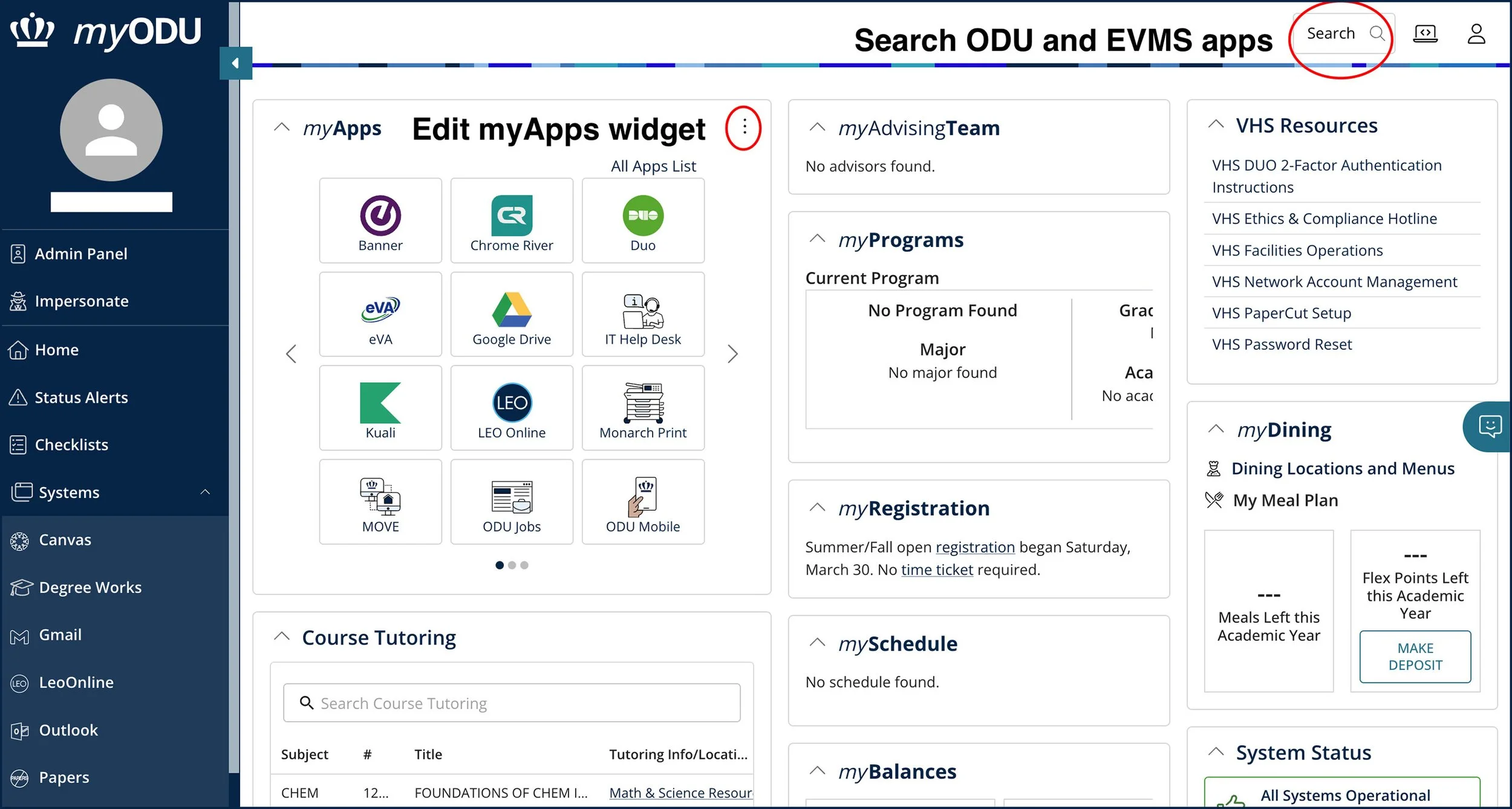
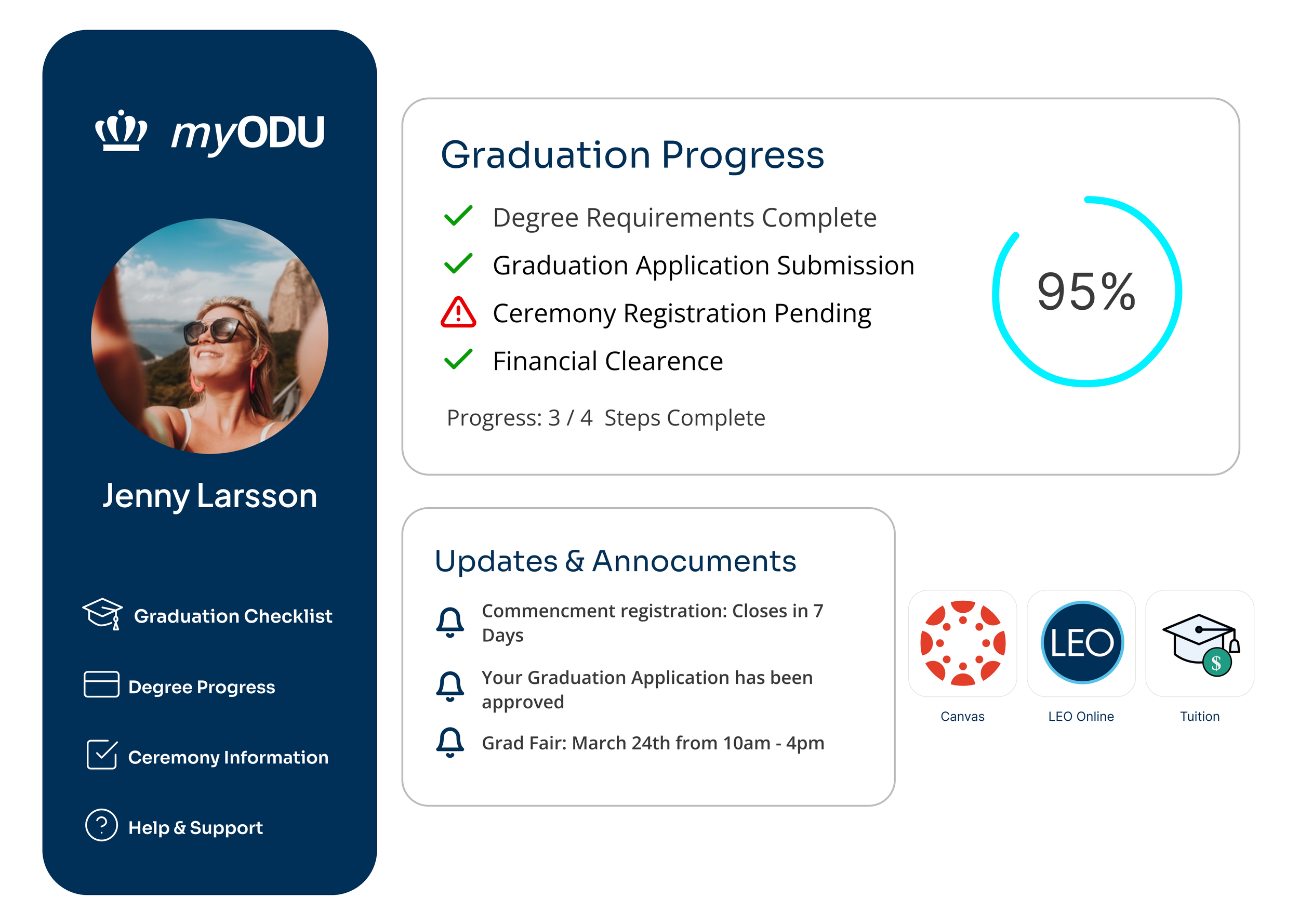
With an added Graduation status bar for upcoming graduates in their myODU portal dashboard. Students will have quick and easy access to navigating through their graduation journey and important information. Market Research
Existing ODU Experience
The current experience requires students to move between:
DegreeWorks
LEOnline
Graduation application pages
Commencement pages
Email communications
Weaknesses
Information fragmentationDense languageLack of progress visibilityUnclear eligibility statusMultiple navigation paths
Opportunities
Centralized dashboardClear visual progress trackingContextual help/supportSimplified navigationReal-time graduation readiness indicators

Design Process
Low-Fidelity Wireframes
Initial sketches focused on:
Centralizing graduation information
Reducing navigation depth
Prioritizing visual hierarchy
Simplifying status visibility
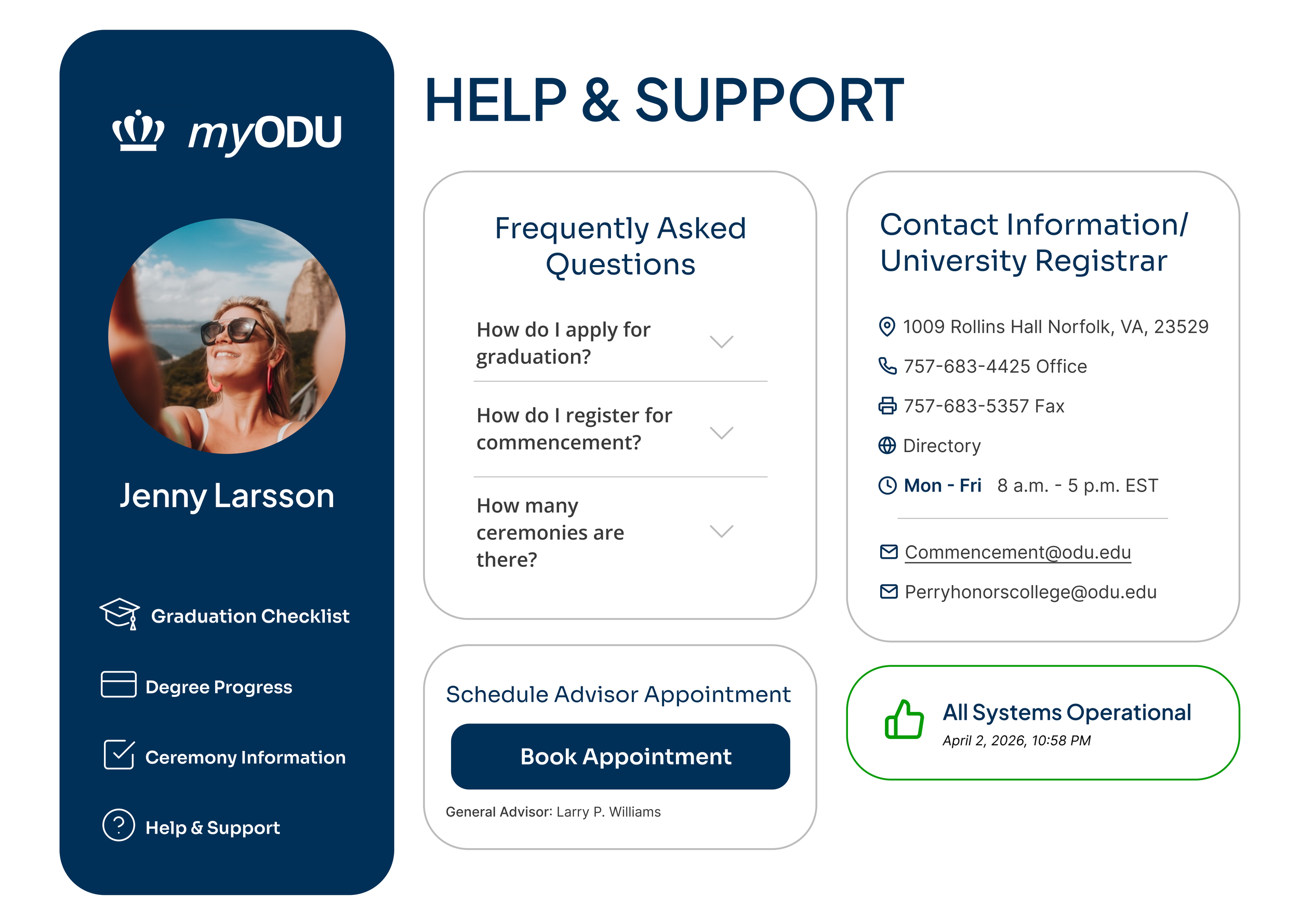
SEE THE PROTOTYPE IN ACTION
myGraduationStatus
Students own myGraduationStatus bar that would appear on upcoming graduate students dashboard in their myODU portal.Visual GoalsThe interface was designed to feel:CleanReassuringOrganizedEasy to scanFamiliar to ODU students
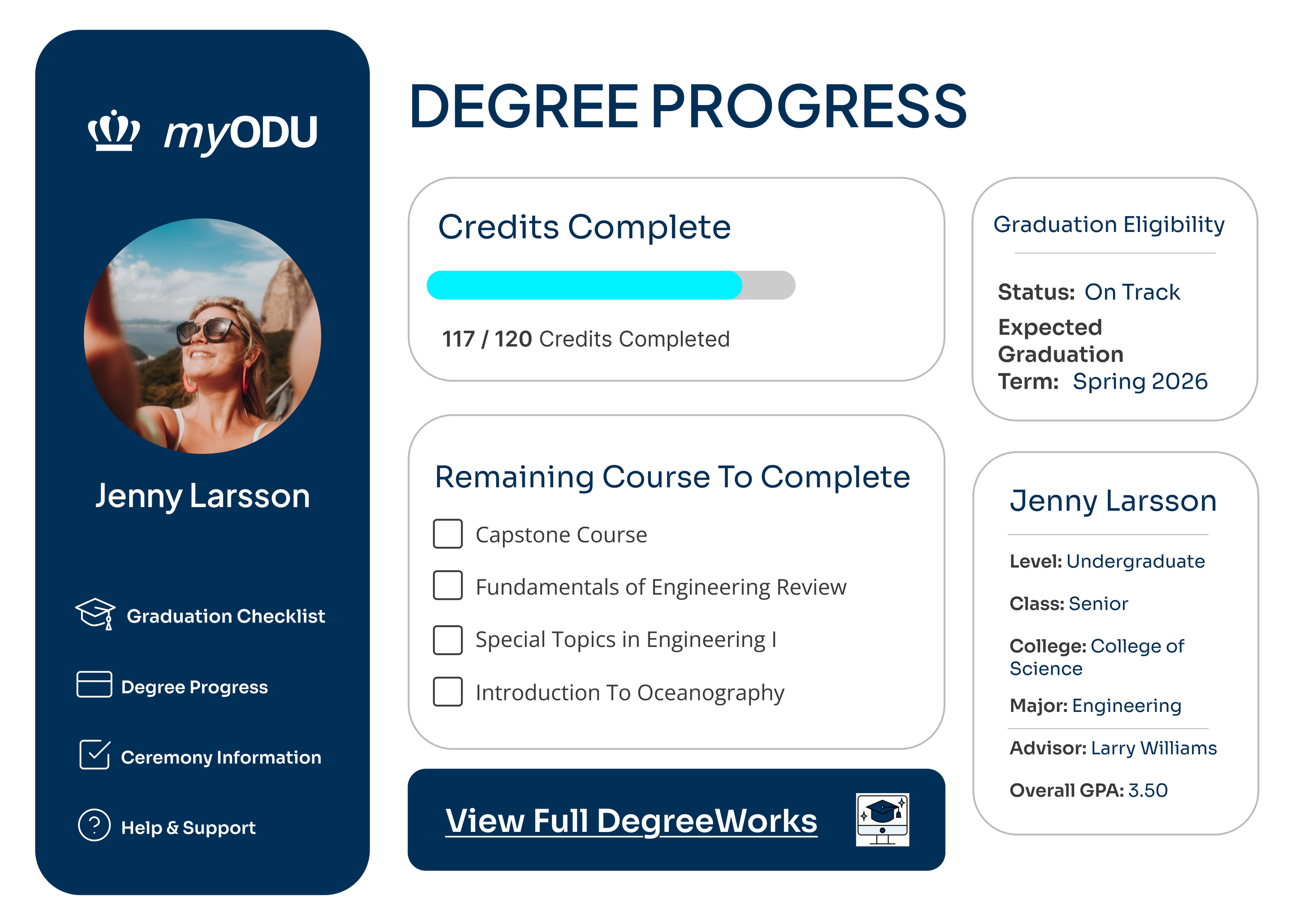
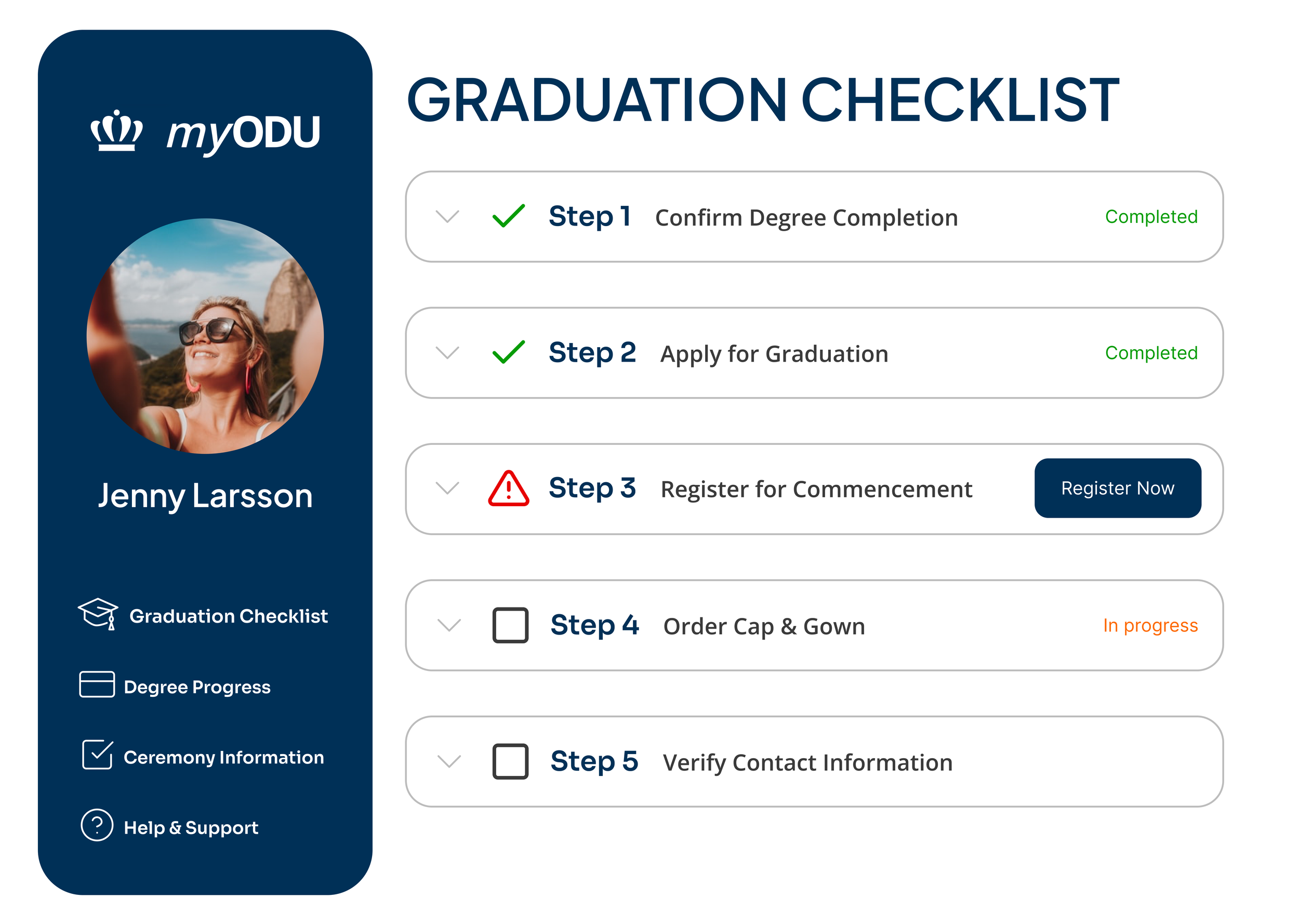
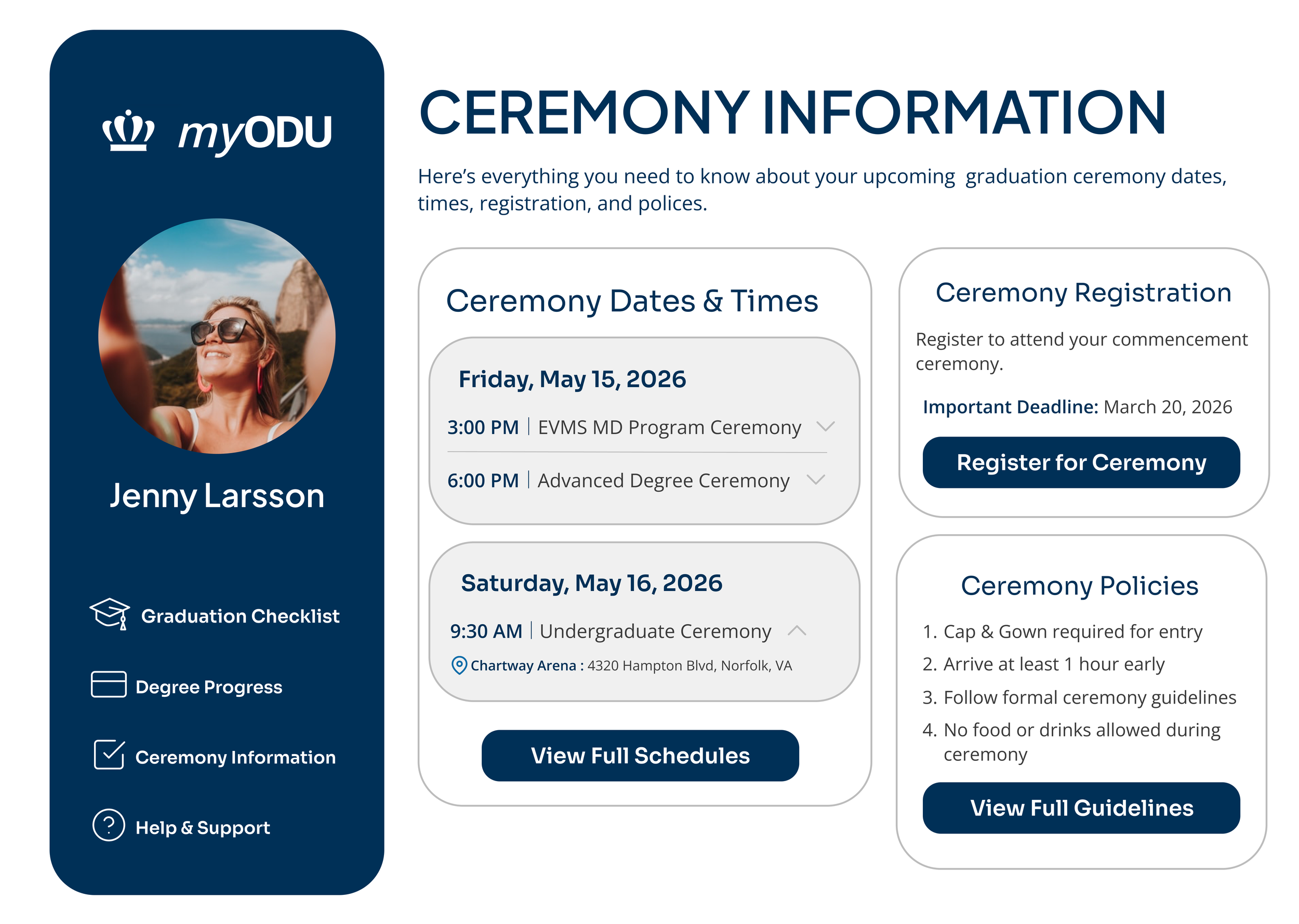
Graduation Status Page/Dashboard
A full created graduation status page where students can have easy access to important information and support.
Visual System
ODU-inspired color paletteCard-based information sectionsProgress indicatorsChecklist interactionsClear navigation labelsDashboard-style layout
Reflection and Key Takeaways
What WorkedUsers quickly understood the system’s purposeParticipants consistently identified the checklist and progress areas firstCentralizing information reduced confusionClear visual organization improved navigation confidenceMost users completed tasks with little to no assistance
What Didn’tSome first-time users experienced brief uncertaintySupport/contact information needed stronger visibilitySome requirement details lacked enough explanation depthCertain navigation labels could be more explicit
By centralizing graduation information and streamlining the user journey, the design reduces stress, improves clarity, and empowers students to graduate with confidence. This project reinforced the importance of information architecture, emotional reassurance, clarity, and trust-building in high-stakes educational systems, and showed that lowering user stress depends not just on functionality but on helping users feel assured in their decisions. Future improvements could include personalized graduation timelines, real-time advisor messaging, smarter progress validation, mobile optimization, and interactive onboarding experiences.
TRY THE INTERACTIVE PROTOTYPE